
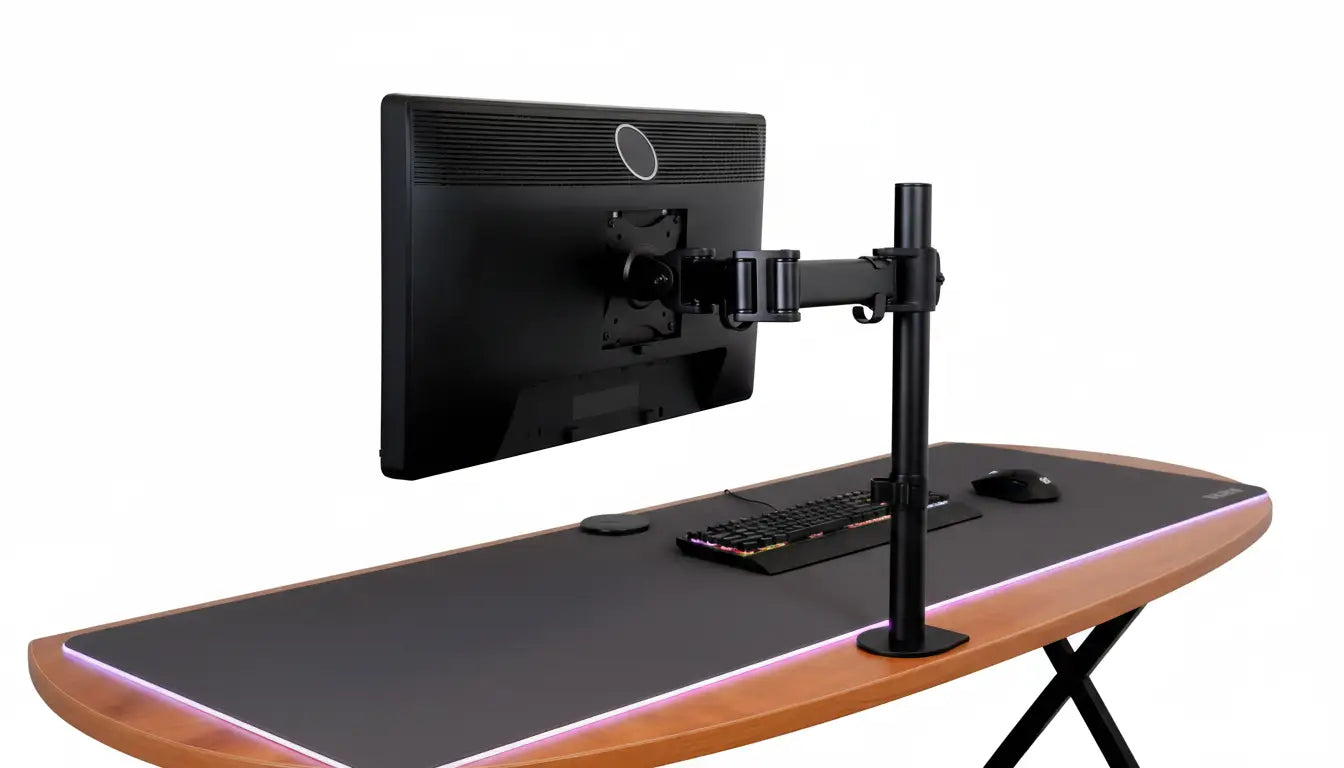
VESA-compatible monitors are displays that have standardised mounting holes on the back. Four holes. Same spacing every time. This simple feature unlocks everything. You can mount them on arms. You can mount them on walls. You can position them however you want. No fixed base. No limitations. Just flexibility. Whether you build a gaming setup, a professional workstation, or a home office, choosing a VESA-compatible monitor allows you to maximise your desk space.

Key Takeaways
- VESA compatible monitors feature standardised mounting holes (75x75mm, 100x100mm, 200x200mm) that work with adjustable arms and brackets
- Most modern monitors are VESA-compatible, but checking specifications before purchase prevents compatibility issues
- Common VESA patterns: 75x75mm for 21-24 inch monitors, 100x100mm for 27-32 inch displays, 200x200mm for larger screens
- VESA compatibility enables ergonomic positioning, saves desk space, and future-proofs your investment
- Gaming monitors, professional displays, and budget options all offer VESA compatibility in the Singapore market
- Weight capacity matters; always choose a mount rated higher than your monitor's actual weight
- Multi-monitor setups with VESA-compatible displays create powerful workspaces for gaming, trading, design, and content creation
- Guilds Altura Stand offers integrated VESA mounting combined with USB connectivity, RGB lighting, and storage solutions
- Converting non-VESA monitors to VESA compatibility is possible with adapter plates but requires careful consideration
Understanding VESA Compatible Monitors

VESA compatible monitors are simply displays with standardised mounting holes on the back. The Video Electronics Standards Association created this standard so that monitors and mounting solutions would work together universally.
Think of it like a USB. Every USB cable works with every USB port. VESA works the same way. Any monitor with VESA holes connects to any mount with VESA compatibility. No confusion. No proprietary systems that lock you into one brand.
Why does this matter? Freedom. You are not tied to a fixed monitor stand. You can use an adjustable arm. You can wall-mount your display. You can desk-mount it. You can change your setup whenever you want. Your monitor works with all of it.
Before VESA, manufacturers did whatever they wanted. One brand put holes here. Another put them there. Different thread sizes. Different spacing. Chaos. Customers hated it. Manufacturers realised the problem. VESA solved it. Now, thirty years later, the standard is everywhere. Every major monitor brand respects it. Every professional mounting solution expects it.
In Singapore, VESA compatibility is standard on nearly every monitor sold. Whether you buy from Courts, Best Denki, or online from Lazada and Shopee, you are getting VESA-compatible displays. The market moved past non-VESA options. This is actually good news for buyers. It means choice. It means flexibility. It means your investment is future-proof.
VESA Compatibility Standards And Patterns
Common VESA patterns in monitors

VESA patterns are simply measurements. Four holes. Measure the distance between them. That measurement is your pattern.
- VESA 75x75mm is the smallest standard. Found on 21-24 inch monitors. Older displays use this. Budget monitors use this. It is still common but less so as monitors grow larger.
- VESA 100x100mm is the most common pattern today. 27 and 32 inch monitors usually have this. Gaming monitors have this. Professional displays have this. If you buy a modern monitor in Singapore, it probably has VESA 100x100. This is the standard size. The one you should assume when shopping.
- VESA 200x200mm appears on larger displays. 40-50 inch monitors sometimes use this. Professional wall displays use this. Less common for personal use. Less common in Singapore homes because monitors that large are not practical for most people.
- VESA 400x400mm is massive. Very large professional displays. Control room monitors. Digital signage. Rare in consumer markets. Do not worry about this unless you are setting up a television or digital billboard.
For most Singapore buyers, VESA 100x100 is your target. It covers the sweet spot of monitor sizes (27-32 inches) that actually get used in homes and offices.
Monitor size and VESA pattern relationships

Understanding which size monitor uses which pattern prevents buying mistakes.
- 21-24 inch monitors typically use VESA 75x75mm. These are smaller displays. Entry-level. Budget-friendly. Perfect for small desks or secondary monitors. Weight is usually 3-5kg, so any basic mount works.
- 27-32 inch monitors typically use VESA 100x100mm. This is the sweet spot. Good screen size for productivity and gaming. Most people choose this range. Weights typically range from 5-8kg depending on build quality.
- 34-inch ultrawide displays sometimes use VESA 200x100mm (rectangular instead of square). They are heavier (8-12kg). Require sturdier mounts. Popular with gamers and content creators.
- 40+ inch displays are rare for personal use. Usually commercial grade. Use larger VESA patterns. Skip this category unless you are doing something unusual.
Know your monitor size before shopping. Match the size to the VESA pattern. Verify both before buying a mount. This simple process prevents expensive mistakes.
VESA weight ratings and load capacity

VESA patterns do not tell the whole story. Weight capacity does.
A VESA 100x100 mount might support 6kg. Or it might support 12kg. Different mounts, same VESA pattern, different capacities. This matters.
Here is the golden rule: your monitor must weigh less than the mount's maximum capacity. Not equal. Less. And ideally, leave a 20-30% safety margin. If your monitor weighs 6kg, buy a mount rated for 8-10kg. Not 6kg.
Why? Gas springs lose pressure over time. Metal fatigues. Springs weaken. You need headroom. You need safety margin. This prevents monitors from sagging or drifting downward after months or years of use.
Check your monitor's weight. It is in the specifications. Check the mount's weight capacity. It is in the product description. Do the maths. Make sure the monitor weighs significantly less than the maximum. Then you have a safe setup that lasts.
In Singapore, most quality mounts clearly list weight capacity. Do not buy from sellers who do not specify this information. It is a red flag.
Popular VESA Compatible Monitor Brands And Models
Gaming VESA compatible monitors

Gaming pushes monitor technology hard. Gamers demand speed. High refresh rates. Low response times. Fast colours. All VESA-compatible.
- ASUS ROG makes excellent gaming monitors. The TUF and ROG lines all support VESA. Refresh rates from 144Hz to 360Hz depending on model. Prices in Singapore range from SGD $300-800. Curved screens available. Straight screens available. VESA 100x100 standard on most models.
- LG UltraGear competes directly with ASUS. Similar specs. Similar pricing. VESA-compatible throughout the range. Excellent response times. Popular in Singapore esports scene.
- Samsung Odyssey curved displays offer immersive gaming. VESA-compatible. High refresh rates. 27 to 49 inch range. Prices SGD $400-1000+ depending on size and refresh rate.
All of these brands respect VESA standards. You can mount them on any VESA arm. You can customise your setup. You are not locked into their proprietary stands.
Professional VESA compatible displays
Professional work demands colour accuracy. Precision. Consistency. These monitors deliver.
- Dell UltraSharp is the standard for professional work. Photographers trust it. Designers rely on it. Priced SGD $500-1500 depending on size and resolution. All VESA-compatible. Excellent build quality. Lasting equipment.
- LG UltraFine targets content creators. Video editors use these. Photographers use these. VESA-compatible. Accurate colour reproduction. Trusted brand. SGD $600-1200 typical pricing in Singapore.
- ASUS ProArt professional displays offer similar quality. VESA-compatible. Colour-accurate. Wide colour gamut. Good choice for serious creative work.
These displays cost more than gaming monitors. But they last longer. They maintain colour accuracy over years. They justify the investment for professionals.
Budget VESA compatible monitor options
Budget does not mean bad. Good quality exists at lower price points.
- LG IPS monitors in the 24-27 inch range often include VESA mounting and cost SGD $150-300. Reliable. Durable. Good colour. Not fancy but solid.
- ASUS VA monitors offer similar value. VESA-compatible. Good brightness. Affordable. Popular choice in Singapore for budget-conscious buyers.
- Dell SE series provides professional build quality at budget pricing. VESA-compatible. Good reliability. SGD $200-400 range.
Shopping for budget monitors? Search specifically for "VESA compatible monitor" on Lazada or Shopee. Filter by price. Read reviews. Many excellent budget options exist. You do not need to spend SGD $1000 to get a quality VESA-compatible display.
How To Identify VESA Compatible Monitors

Checking monitor specifications
Never guess. Always verify.
Go to the manufacturer's website. Search for your monitor model. Download the specifications. Look for "VESA" in the document. It will say something like "VESA 100x100mm". Done. You have your answer.
If you cannot find the manual online, contact the manufacturer's support. Email them. They respond quickly. Ask one question: "What is the VESA mounting pattern for this monitor?" They tell you. No guessing. No assumptions.
Product listings on Lazada, Shopee, and retailer websites should list VESA compatibility. It is a selling point. Smart retailers highlight it because buyers ask. If VESA information is missing, ask the seller directly. Good sellers respond quickly.
For Singapore buyers, this matters because return policies are important. If you buy a monitor thinking it is VESA-compatible and it is not, you need to return it. Make sure you verify before purchase. Read specifications carefully. Ask if unsure.
Physical inspection for VESA compatibility
Sometimes you already own the monitor. Or you are looking at one in a shop. Physical inspection answers the question.
Turn off the monitor. Unplug it. Flip it over carefully. Look at the back panel. Do you see four holes arranged in a square? Congratulations. Your monitor is VESA-compatible.
Get a ruler. Measure from the centre of one hole to the centre of the hole across from it (not diagonal). That distance is your VESA pattern. Usually 75mm, 100mm, 200mm, or 400mm.
Repeat for the other direction. If both measurements are the same, you have a square pattern (like 100x100). If they are different, you have a rectangular pattern (like 200x100).
Write down the measurement. Check it against VESA mounting standards. Confirm what pattern you have. Then shop for mounts that support that pattern.
This physical method works for any monitor. Old or new. Brand name or generic. Takes five minutes. No guessing. Complete certainty.
Benefits Of Choosing VESA Compatible Monitors

- Ergonomic positioning becomes possible. Your monitor can be at exactly the right height. Exact angle. Exact distance. This prevents neck pain. Prevents eye strain. Prevents long-term health problems. Standard monitors stuck on fixed bases cannot offer this. VESA-compatible monitors can.
- Space-saving matters in Singapore where space is precious. A monitor arm clears the space underneath your monitor. That is extra desk real estate. Room for keyboard. Room for books. Room for coffee. Every centimetre counts in small flats.
- Upgrade flexibility is huge. Buy a new monitor in five years. Your VESA mount still works. Attach the new monitor. Keep using the mount. No waste. No need to replace working equipment. Just swap displays. This saves money long-term.
- Multi-monitor capability opens possibilities. VESA-compatible monitors work seamlessly together. Two monitors side-by-side. Three monitors in a row. Vertical and horizontal combinations. All possible because they share the same mounting standard. Non-VESA monitors cannot do this as easily.
- Professional appearance matters for remote workers. A clean workspace with a mounted monitor looks organised. Looks intentional. Looks professional. Video call backgrounds matter. Your setup should reflect well on you.
These benefits accumulate. Together they create a workspace that is healthier, more productive, and more flexible than traditional setups.
VESA Compatible Monitor Setup And Installation
Choosing the right VESA mount
Your monitor needs a mount. Many options exist. Choose based on your needs.
- Desk clamp arms are most popular. They attach to your desk edge. Offer height adjustment. Swivel. Tilt. Rotate. Perfect for most people. Guilds Altura Stand is a desk arm with integrated features like USB ports, RGB lighting, and storage.
- Wall brackets save desk space. Flat. Minimal. Good for small rooms. Less adjustable than arms but clean looking.
- Ceiling mounts are unusual but useful in some setups. Hanging displays from above frees floor and wall space.
- Pole mounts offer flexibility. Mount to vertical poles. Adjust up and down. Popular in commercial settings.
Choose based on your desk type, available space, and how much adjustment you want. Most Singapore users choose desk arms because they offer the best balance of flexibility and practicality.
Installing VESA compatible monitors
Installation is straightforward. Takes 15-30 minutes. Bring patience. Take your time.
- Step 1: Prepare. Clear your workspace. Have tools ready (usually screws and an Allen wrench included). Read the mount's instruction manual first. Do not skip this.
- Step 2: Attach the VESA bracket to your monitor. Find the mounting holes on the back of your monitor. Align the bracket. Insert screws. Tighten evenly. Do not crank one screw all the way then move to the next. Go round and round. Even pressure prevents warping.
- Step 3: Mount to your desk or wall. Follow the mount-specific instructions. Clamp to desk. Or drill holes for wall mounting. Make sure it is secure. No wobble.
- Step 4: Test. Adjust the monitor gently. Check all movement. Make sure nothing moves unexpectedly. Stability is essential.
- Step 5: Cable management. Route cables through any clips included with the mount. Use zip ties if needed. Tidy cables look professional and prevent accidental disconnection.
Done. Your VESA monitor is now mounted and ready to use.
Optimising VESA monitor positioning
Mounting is done. Now position it properly.
- Height. Your eyes should look straight ahead at the top third of your screen. Sit normally in your chair. Relax. Look forward. Your eyes should land on the upper portion of the display. If you are looking down, raise the monitor. If you are looking up, lower it.
- Distance. Roughly 50-70 centimetres from your eyes to the screen. About an arm's length. This reduces eye strain. Lets you see the whole screen without moving your head.
- Angle. Tilt the monitor back slightly. About 10-20 degrees. This reduces glare. Reduces neck strain from looking straight down.
- Multiple monitors. If you have two or more, align them so the bezels (black borders) line up neatly. Minimise the visual gap between screens. Your eyes track more smoothly across aligned displays.
Take your time positioning. Spend a few days with the setup. If something feels wrong after a week, adjust. Your body will tell you if the position is not right. Listen to it.
Multi-Monitor Setups With VESA Compatible Displays
Dual VESA monitor configurations

Two monitors give roughly double the screen space. Most popular dual arrangement is side-by-side.
- Side-by-side. Your main work on the left. Reference on the right. Or swap. Whatever works for your workflow. Writers put documents on one screen and reference websites on the other. Traders watch charts on one and execute on the other. Productivity jumps.
- Stacked. One monitor above the other. Less common but useful for specific work. Programmers like the extra vertical space for code. Document readers like the narrow width matching page dimensions.
Both arrangements work on Windows and macOS. Both let your cursor move seamlessly between screens. Both increase real estate and productivity.
For Singapore buyers shopping for dual setups, consider whether you want matching monitors (same size and model) or different sizes. Matching looks cleaner. Different sizes offer flexibility. Both work technically.
Triple and quad monitor VESA setups

Three monitors create immersive workspaces. Popular with gamers, traders, and creative professionals.
- Horizontal arrangement. Three monitors in a row. Side-by-side-by-side. Panoramic view. Excellent for gaming where the wide field of view adds immersion. Good for traders watching multiple charts. Content creators like seeing multiple reference materials.
- Curved arrangement. Three monitors curved around you. Centre one directly in front. Two on either side angled inward. More ergonomic. Eyes do not have to travel as far. Popular in professional control rooms.
- Quad setup. Four monitors in a 2x2 grid. Rare for home use. Common in financial trading rooms. Software development teams sometimes use quad setups to see vast amounts of code simultaneously.
Your graphics card must support multiple monitors. Most modern GPUs handle 3-4 displays easily. Check your GPU specs if unsure.
Guilds Altura Stand works for single displays. For multi-monitor setups, you would use it for one display and separate mounts for others, creating a customised workspace tailored to your specific needs.
Mixed orientation VESA monitor layouts
Some work demands mixed orientations. Vertical and horizontal. Asymmetric but functional.
- Portrait side monitors. Centre monitor landscape (horizontal). Left and right monitors portrait (vertical). Programmers love this. Extra vertical space for code. Documentation on side monitors. Clean workflow.
- Vertical stack. Multiple portrait monitors stacked. Document readers prefer this. Full-page view without scrolling.
- Mixed asymmetric. Creative combinations based on your specific work. Video editors might have timeline on one, preview on another, colour tools on a third.
Windows and macOS both support rotated displays natively. Just select "portrait" in display settings. Your desktop rotates automatically. Everything works.
Cable management becomes trickier with mixed orientations. Plan your routing carefully. Do not let cables tangle or cross unnecessarily.
Gaming With VESA Compatible Monitors
Gaming demands speed. Refresh rate matters. Response time matters. VESA compatibility helps.
- High refresh rate displays. 144Hz minimum for competitive gaming. 240Hz for serious players. 360Hz for extreme competition. VESA-compatible gaming monitors support all these speeds. Mount them at exactly the right angle and distance for peak performance.
- Response time. Below 5ms is standard. Some claim 1ms. Lower is better. Fast response prevents motion blur during frantic gameplay. VESA mounting lets you position your monitor perfectly to leverage this speed advantage.
- Curved screens. Popular with gamers. Immersive field of view. VESA-compatible curved monitors exist. They mount perfectly on VESA arms. Creating the perfect gaming position becomes possible.
- Multi-monitor gaming. Three monitors create an enormous field of view. Your peripheral vision fills with action. Immersive beyond belief. All VESA-compatible. All mountable on adjustable arms.
Singapore esports players increasingly choose VESA-compatible monitors precisely because they can customise positioning. Competitive advantage comes from optimisation. VESA mounting enables that optimisation.
Professional Work With VESA Compatible Monitors
Professional work requires precision. Colour accuracy. Multiple display real estate. VESA-compatible displays enable all of this.
- Colour-critical work. Photographers calibrate their monitors. Designers need accurate colours. Video editors must trust their displays. VESA-compatible professional monitors support hardware calibration. They maintain colour accuracy. They make this work possible.
- 4K resolution. High-resolution VESA-compatible displays exist. 3840x2160. Incredibly sharp. Perfect for detailed work. Professional monitors in Singapore pricing SGD $800-2000+ for quality 4K displays.
- Multiple displays. Video editors use three monitors. Timeline on one. Preview on another. Colour tools on the third. All VESA-compatible. All mounted perfectly.
- CAD and design. Engineers and architects need space to see complex drawings. Multiple VESA-compatible displays let them work faster. More screen real estate means less scrolling. Less scrolling means higher productivity.
- Financial trading. Trading requires monitoring multiple data streams simultaneously. Three or four VESA-compatible monitors let traders watch various markets in real-time. All positioned perfectly for quick reference.
For professionals in Singapore, VESA compatibility is non-negotiable. It ensures equipment flexibility. It future-proofs investments. It enables the precise positioning that professional work demands.
Troubleshooting VESA Compatible Monitor Issues
Problems occasionally happen. Most are easy to fix.
- Monitor does not fit the mount. Check VESA patterns. Yours might be 75x75mm but your mount expects 100x100mm. Solution: get a VESA adapter. Available cheaply. Solves the problem.
- Monitor feels unstable or wobbly. Check all screws. Tighten them. Ensure the mounting bracket is secure. Check the desk clamp or wall bracket. Tighten those too. Wobble usually means something is loose.
- Monitor sags downward. Weight exceeds mount capacity. Or springs have weakened. Check weight capacity. If your monitor is too heavy, buy a stronger mount. If the mount is old, the springs may have lost pressure. Buy a new mount.
- Cannot adjust the monitor. Friction is too tight. Turn the friction adjustment screws on your mount. Loosen gradually until movement becomes smooth.
- Cables get stressed or bent. Poor cable routing. Route cables through the mount's cable channels. Use zip ties to bundle them. Keep them away from moving joints.
Most issues resolve by checking connections, tightening screws, or adjusting friction. Take time. Do not force anything. Gentle tweaking usually fixes things.
Frequently Asked Questions
Are all modern monitors VESA compatible?
Almost all modern monitors are VESA-compatible. The market moved past non-VESA options years ago. Major brands (Dell, LG, ASUS, Samsung) all use VESA standards.
Exceptions exist. Some specialty curved gaming monitors. Some ultra-thin designs where manufacturers skipped VESA for design reasons. Some very old monitors (pre-2010) lack VESA.
Rule of thumb: if you buy a monitor made in the last ten years from a major brand, it has VESA. Verify by checking specifications. But expect VESA. It is standard now.
What VESA pattern does my monitor size need?
Common size to VESA pattern guide showing 21-24 inch displays using 75x75mm, 27-32 inch monitors using 100x100mm, 34-inch ultrawide using 200x100mm, and weight specifications corresponding to each size category
21-24 inch monitors typically use VESA 75x75mm. 27-32 inch monitors typically use VESA 100x100mm. 34+ inch displays typically use VESA 200x200mm or 200x100mm.
These are guidelines, not rules. Always check specifications for your specific monitor model. Do not assume. Verify. It takes 30 seconds and prevents buying the wrong mount.
Can I use any VESA mount with compatible monitors?
Most VESA mounts work with VESA-compatible monitors. But weight capacity and size matching matter. A mount rated for 6kg will not safely hold a 10kg monitor. Always verify weight capacity.
Some monitors are very large. Very heavy. They need heavy-duty mounts. Standard mounts might not support them. Check specifications before buying.
If VESA patterns do not match perfectly (like 75x75 monitor with 100x100 mount), adapter plates exist. They are cheap. They solve the problem.
How do I know if my monitor is VESA 100 or 75?
Measure. Get a ruler. Measure from hole centre to hole centre. That distance is your VESA pattern. 75mm means VESA 75x75. 100mm means VESA 100x100. Simple.
Or check your manual or manufacturer's website. Specifications are listed there.
Guessing wastes time. Measuring takes two minutes. Do it once and you know forever.
Are VESA compatible monitors more expensive?
No. VESA compatibility is now standard. It does not add cost. Every monitor brand includes VESA. No premium. No extra charge. Just standard practice.
Some specialty monitors cost more because they have better features (higher refresh rate, better colour, curved design). But those features cause the price difference. Not VESA compatibility. VESA is baseline now.
Can I convert a non-VESA monitor to VESA compatible?
Possible but tricky. Aftermarket VESA adapter plates exist. They clamp or adhere to non-VESA monitors and add VESA holes. Cost is modest. Usually works fine.
DIY drilling VESA holes is possible but risky. You could damage your monitor. Hit internal components. Crack the plastic. Not recommended unless you are comfortable with electronics.
Professional modification services exist. Specialists can drill proper VESA holes. Cost is higher but ensures quality. Search for monitor repair services in Singapore if you want this option.
What is the heaviest monitor that VESA mounts can support?
Weight capacity varies by mount. Basic mounts support 4-6kg. Standard mounts support 6-12kg. Heavy-duty mounts support 12-20kg or more.
Always choose a mount rated higher than your monitor's weight. Leave safety margin. Do not max out capacity.
For very heavy displays (40+ inches, very thick frames, premium builds), seek heavy-duty commercial-grade mounts. They are expensive but necessary for extreme weight.
Conclusion
VESA compatible monitors are the smart choice for anyone building a workspace. They offer flexibility that fixed-base monitors cannot match. They work with infinite mounting solutions. They enable ergonomic positioning. They support multi-monitor setups. They future-proof your investment.
In Singapore's competitive market, nearly every quality monitor is VESA-compatible. When shopping, verify this during the specification check. Ensure the mounting holes match available mounts. Ensure weight capacity is sufficient. These simple checks ensure successful setups.
Whether you build a gaming powerhouse, a professional workstation, or a simple home office, VESA compatibility opens possibilities. Your workspace becomes flexible. Your monitor can move. Your desk can transform. Your setup adapts to how you actually work.
At Guilds, we designed the Altura Stand VESA Edition to work with any VESA-compatible monitor. We understand that flexibility matters. Our all-in-one solution combines VESA mounting with USB connectivity, RGB customisation, and organised storage. Visit Guilds homepage to explore how we approach workspace optimisation.
Ready to build your perfect setup? Browse monitor options in Singapore and discover how VESA compatibility transforms your workspace. Contact our team with any questions about VESA mounting solutions or monitor compatibility. We help you build workspaces that work as hard as you do.
Monitor Setup: Complete Guide To Perfect Display Configuration
Monitor Arm Singapore: Complete Guide To VESA Monitor Mounts