
If you spend hours at your desk every day, your monitor setup can have a bigger impact on your comfort than you might think. A screen that sits too low, takes up too much desk space or cannot be adjusted properly can gradually lead to neck strain, shoulder tension and a workspace that feels cramped and inefficient.
That’s why more people are rethinking how they position their screens. The two main options are monitor arms and monitor stands.
Both help you get your screen to the right height and keep your desk organised, but they work differently and fit different setups.
This guide breaks down what monitor arms and stands do, how they help, and how to pick the right one for a workspace that actually works for you.
Key Takeaways
- A monitor arm lifts your screen to eye level and lets you adjust it any time. If you want better posture and more desk space, this is the way to go.
- Monitor stands are a simple way to raise your screen; no installation is needed. They also give you extra storage, which is great if you want a tidy desk.
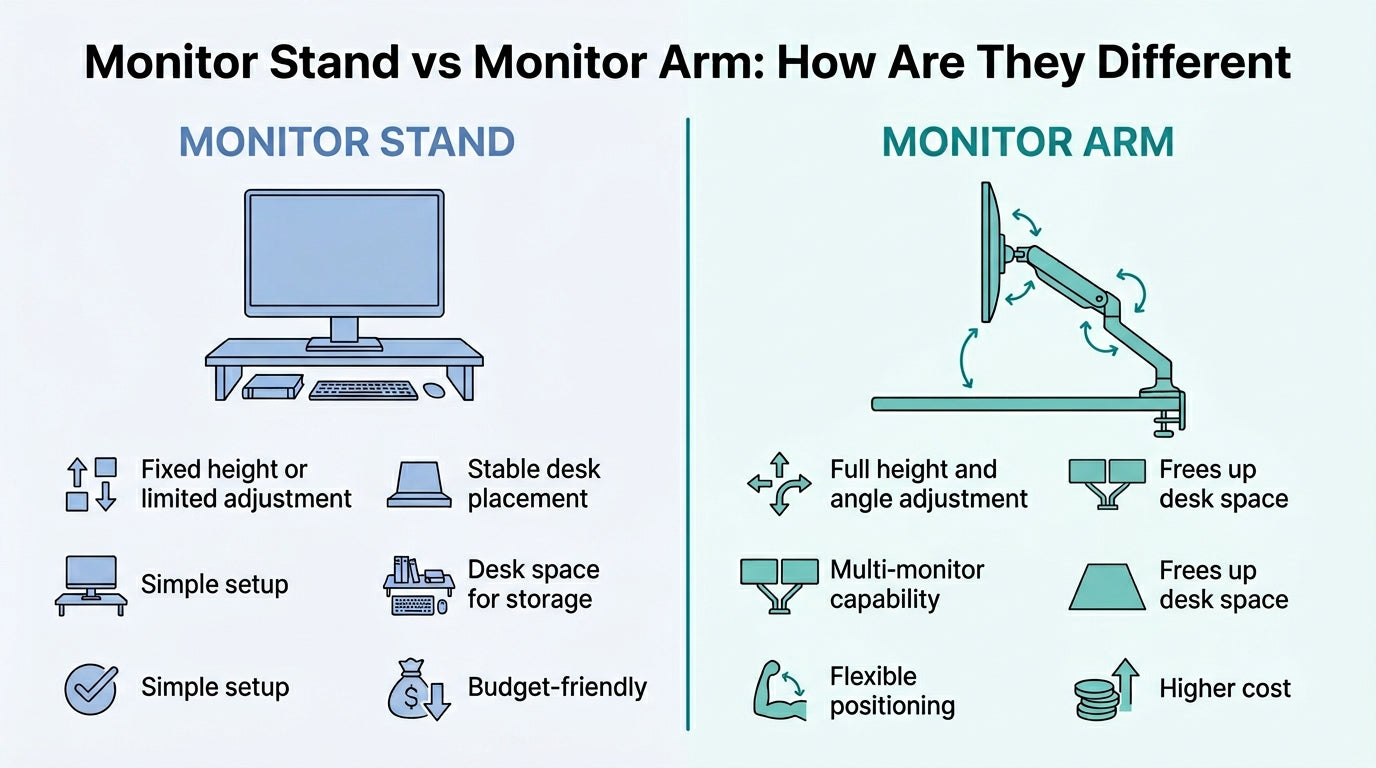
- The big difference: monitor arms move, monitor stands don’t. Arms let you tilt, swivel, and adjust height. Stands stay put and keep things stable.
- The right pick depends on your monitor size, your desk, and how often you move your screen. Each type fits a different need.
- Both options make your workspace more comfortable and organised. The best choice comes down to what matters most: adjustability, storage, or quick setup.
What Is a Monitor Arm?
A monitor arm is an adjustable mount designed to hold a computer monitor above the desk surface. Instead of using the monitor’s built-in stand, the screen attaches to the arm through a VESA mounting plate located on the back of the monitor.
The arm itself is typically attached to the desk using either:
- a desk clamp mount, which grips the edge of the desk
- a grommet mount, which attaches through a hole in the desk
Once installed, the monitor arm allows the screen to move in multiple directions. Users can adjust the height, tilt the monitor, rotate it between landscape and portrait orientation, or move it closer or further away from the viewing position.
Because of this flexibility, monitor arms are widely used in modern workspaces where users need adjustable viewing angles and efficient desk layouts. They are commonly found in offices, home workstations, gaming setups and creative studios.
Benefits of Using a Monitor Arm

Monitor arms provide several advantages for users looking to create a more comfortable and organised workspace.
- Improves Ergonomics: One of the biggest benefits of a monitor arm is the ability to position the screen at eye level. When monitors sit too low on the desk, users often tilt their heads downward, which can gradually lead to neck and shoulder strain.
Adjust the height and keep your posture natural all day.
- Frees Up Desk Space: Monitor arms lift the monitor off the desk surface, creating more usable workspace. This additional space can be used for keyboards, notebooks or other desk accessories.
This is a game-changer for small desks, especially in Singapore homes and apartments.
- Flexible Viewing Angles: Monitor arms allow users to adjust screen angles easily. The monitor can be tilted, rotated or moved closer and further away depending on comfort and viewing conditions.
- Supports Multi-Monitor Setups: Many professionals rely on multiple monitors to improve workflow efficiency. Dual monitor arms allow two screens to be positioned side by side or stacked vertically. This setup is common among developers, designers and financial professionals.
- Cleaner Desk Setup: Monitor arms often include built-in cable management systems that keep wires organised and out of sight, helping create a cleaner and more minimalist workspace.
Put it all together, and monitor arms are a smart upgrade for any workspace. They help you sit better, free up space, and keep your setup flexible and clean.
Types of Monitor Arms

Monitor arms are available in several configurations depending on the number of monitors supported and the level of adjustability required.
- Single Monitor Arm: Single monitor arms support one display and are the most common type. They offer full adjustability while maintaining a clean, minimal desk layout. These arms are ideal for users who work with a single screen but still want flexibility in positioning.
- Dual Monitor Arm: Dual monitor arms support two monitors using a single mounting system. This allows both screens to be adjusted independently while keeping the desk organised. Dual monitor setups are widely used in professional environments where multitasking across multiple applications is common.
- Gas Spring Monitor Arm: Gas spring monitor arms use a tension mechanism that allows the monitor to move smoothly with minimal effort. These arms are ideal for users who frequently adjust their screen height or change positions throughout the day.
- Heavy Duty Monitor Arm: Heavy-duty monitor arms are designed to support larger displays, such as ultrawide monitors or heavier screens. These arms typically have higher weight capacity and stronger joints to maintain stability.
Each type of monitor arm serves a different purpose, so the best option depends on your monitor size, desk setup and daily work habits. Some users may only need a simple single-monitor arm, while others may benefit from the flexibility of a gas-spring model or the support of a heavy-duty arm.
What Is a Monitor Stand?
A monitor stand is a platform that lifts your screen above the desk. Unlike arms, stands sit right on your desk and hold the monitor up with a simple raised surface.
Monitor stands make it easy to raise your screen and add storage underneath. You can slide your keyboard, notebook, or accessories right under the stand.
Because monitor stands require no installation, they are often chosen by users seeking a quick, straightforward solution to improve desk ergonomics.
Benefits of Monitor Stands

Monitor stands offer several practical advantages for users looking to create a more comfortable and organised workspace.
- Improves Monitor Height: By raising the monitor above the desk surface, monitor stands help position the screen closer to eye level. This can reduce neck strain from prolonged downward gaze.
- Easy to Set Up: Monitor stands require no installation or mounting hardware. Users simply place the stand on the desk and position the monitor on top.
- Extra Storage Space: Many monitor stands create additional storage space beneath the screen. This area can be used to store keyboards, notebooks, office supplies or small devices.
- Stable Platform: Because monitor stands sit directly on the desk surface, they provide a stable and secure base for monitors.
Together, these advantages make monitor stands a simple and effective way to improve desk ergonomics without major changes to your workspace.
By raising the monitor to a more comfortable height while creating additional storage space, they help keep desks organised and reduce strain during daily computer use.
Types of Monitor Stands

Monitor stands are available in various styles to suit workspace needs.
- Fixed Monitor Stands: Fixed monitor stands provide a stable platform that raises the monitor to a specific height. They are simple and durable.
- Adjustable Monitor Risers: Adjustable risers let users adjust monitor height with adjustable legs or stackable platforms.
- Desk Shelf Monitor Stands: Desk shelf stands combine monitor elevation with storage compartments, helping keep desks organised while improving monitor height.
Choosing the right monitor stand depends on your workspace needs and the level of flexibility you require. While fixed stands offer a stable, straightforward solution, adjustable riser and desk shelf stands provide additional versatility and storage.
The Difference Between Monitor Stand vs Monitor Arm
Both monitor stands and arms help your desk feel better, but they solve different problems.
Monitor arms attach to the desk and suspend the monitor above the workspace, allowing flexible positioning and freeing up desk space.
Monitor stands sit right on your desk and lift your screen with a platform. They don’t move as much, but you get extra storage and zero setup.
The choice between the two depends on factors such as desk size, flexibility needs and personal preference.
Here’s a quick comparison table for you to refer to:
|
Feature |
Monitor Arm |
Monitor Stand |
|
Adjustability |
Highly adjustable |
Limited adjustment |
|
Desk Space |
Frees up desk space |
Uses the desk surface |
|
Installation |
Requires a clamp or grommet |
No installation required |
|
Flexibility |
Tilt, swivel and rotate |
Fixed or limited movement |
|
Storage |
Minimal |
Often includes storage space |
Monitor arms are typically preferred for users who need maximum flexibility and a clean desk layout, while monitor stands are better suited for simpler setups.
Who Should Use a Monitor Arm

Monitor arms are ideal for users who require flexibility in their workspace and frequently adjust their screen position.
They are particularly useful for:
- professionals working with multiple monitors
- designers, developers and video editors
- gamers who need precise screen positioning
- users with limited desk space
- individuals who frequently adjust their monitor height
Monitor arms free up space and give you control over your screen, which makes them perfect for modern work setups.
Who Should Use a Monitor Stand

Monitor stands are a good option for users who prefer a simple and stable desk setup.
They are suitable for:
- home office users with single monitor setups
- individuals who want a quick ergonomic upgrade
- users who prefer additional desk storage space
- people who do not want to install desk-mounted hardware
For many workspaces, monitor stands provide an effective and convenient way to improve screen positioning.
How to Choose the Best Monitor Arm in Singapore

Choosing the right monitor arm is important to ensure your workspace is comfortable, stable and compatible with your monitor.
While many models look similar, several factors determine whether a monitor arm will work properly with your desk setup. The following points can help you select the best monitor arm for your needs.
Check Monitor Weight and Size
One of the most important factors when choosing a monitor arm is the weight of your monitor. Each arm has a maximum load capacity, and exceeding that limit can cause the monitor to sag or become unstable.
Before purchasing a monitor arm, check your monitor’s specifications to determine its weight without the stand. It is generally recommended to choose a monitor arm that can support slightly more weight than your monitor to ensure stability and long-term durability.
Ensure VESA Compatibility
Most monitor arms use the VESA mounting standard, which specifies four screw holes arranged in a square pattern on the back of the monitor. The most common VESA sizes are 75 × 75 mm and 100 × 100 mm.
If your monitor does not have a VESA mount, you may need an adapter to attach it to a monitor arm. Fortunately, most modern monitors support VESA mounting, making them compatible with a wide range of monitor arms.
Consider Your Desk Mounting Options
Monitor arms are typically installed using one of two mounting methods:
- Desk Clamp Mount: Attaches to the edge of the desk and is the most common option.
- Grommet Mount: Installs through a hole in the desk for a cleaner setup.
It is also important to check the thickness of your desk, as clamps only work within certain thickness ranges depending on the monitor arm's design.
Decide Between Single or Dual Monitor Arms
Another important consideration is how many monitors you plan to use.
- Single-monitor arms are suitable for most users who work with a single screen.
- Dual monitor arms allow two displays to be mounted together, improving multitasking and productivity.
If you plan to expand your workspace later, a dual-monitor system may be a more flexible long-term option.
Evaluate Adjustability and Range of Motion
Different monitor arms offer varying levels of flexibility. A good monitor arm should allow you to:
- Adjust height easily
- Tilt the monitor to reduce glare
- Swivel the screen left or right
- Rotate between landscape and portrait orientation
Greater adjustability makes it easier to maintain proper ergonomics and customise your viewing position throughout the day.
Consider Available Desk Space
Desk size is another important factor when choosing a monitor arm. In many Singapore homes and offices, desks may be relatively compact. Monitor arms help free up desk space by lifting the monitor above the surface, making them a practical option for smaller work areas.
Make sure there’s enough room behind your desk so the arm can move without bumping into walls or shelves.
Look for Cable Management Features
Many modern monitor arms include built-in cable management systems that route monitor cables along the arm. This helps keep wires organised and prevents them from cluttering the desk surface.
While this feature may seem minor, it contributes to a cleaner, more professional workspace.
Upgrade Your Workspace with the Right Monitor Support
Both monitor arms and an adjustable monitor stand in Singapore can improve the way your workspace looks and feels, but the best choice depends on how you work, how much desk space you have and how much flexibility you need.
If you want greater adjustability and a cleaner desk layout, a monitor arm may be the better fit. If you prefer a simple, stable setup with extra storage space, a monitor stand can be a practical solution.
Whichever option you choose, upgrading your monitor setup can make a meaningful difference to posture, comfort and daily productivity.
If you are looking for well-designed workspace solutions, explore Guilds’ range of monitor arms and monitor stands to build a desk setup that works better for you. Contact us today!
Frequently Asked Questions
Are monitor arms worth it?
Yes. Monitor arms improve ergonomics, free up desk space and allow flexible screen positioning, making them a valuable upgrade for many workspaces.
What is the best monitor arm in Singapore?
The best monitor arm depends on your monitor size, weight and desk setup. Adjustable arms that support VESA mounting and smooth height adjustments are often preferred.
Can monitor arms support ultrawide monitors?
Yes, but you should choose a heavy-duty monitor arm designed to support larger monitors and higher weight capacities.
Do monitor arms damage desks?
Most monitor arms use padded clamps that protect the desk surface. As long as the desk is strong enough, they do not cause damage.
How do I know if my monitor is VESA compatible?
Check the back of your monitor for four mounting holes arranged in a square pattern, typically 75 mm or 100 mm apart.
What Is VESA Mount: Complete Guide To Monitor Mounting Standards
How to Install and Adjust Your Monitor Mount for Maximum Ergonomics