
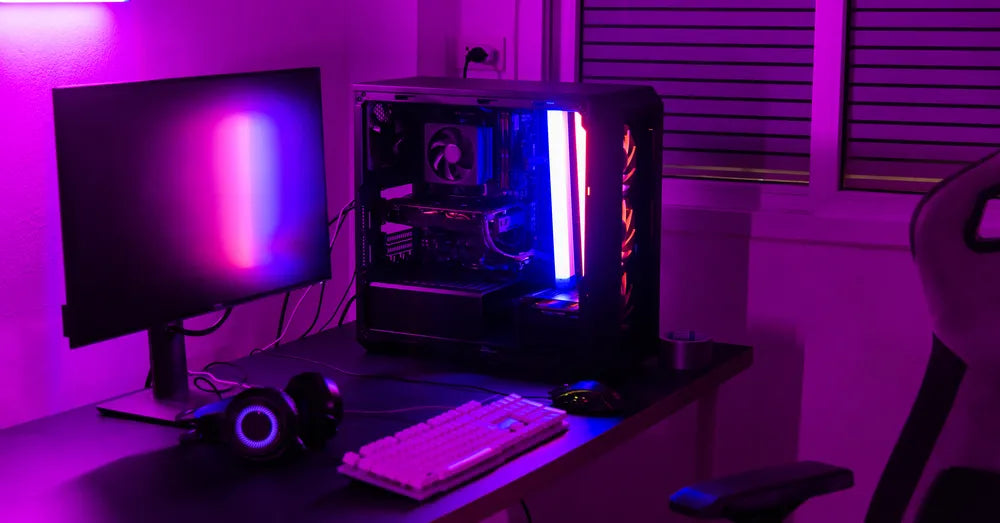
A well-designed workspace is about more than choosing the latest monitor or mechanical keyboard. The way your desk is organised influences how comfortable you feel, how efficiently you work, and even how enjoyable it is to spend time at your computer. One of the simplest upgrades is a customisable monitor stand, which can improve your monitor setup while creating additional storage and supporting better ergonomics.
At Guilds, we believe workspace accessories should be both functional and visually appealing. It doesn't matter if you're creating a clean minimalist office or a dedicated gaming station. The right monitor stand can help organise your workspace without sacrificing style. This guide explores practical ideas to inspire a setup that suits both your workflow and your personal aesthetic.
Key Takeaways
-
A customisable monitor stand helps create a cleaner workspace by improving monitor height while adding valuable storage space.
-
Minimalist and gaming desk setups have different priorities, but both benefit from thoughtful organisation and ergonomic design.
-
Choosing the right monitor stand depends on your desk size, equipment, and daily workflow rather than appearance alone.
-
Accessories such as cable organisers, monitor arms, and desk lighting can complement a monitor stand and improve your overall setup.
-
Small changes to your monitor setup can make your workspace more comfortable, organised, and enjoyable to use every day.
Why Your Monitor Stand Shapes the Entire Workspace
When people plan a desk setup, they often focus on large purchases such as monitors, chairs, or computers. Smaller accessories often have the biggest influence on how organised the workspace feels.
A monitor stand serves several purposes at once. Besides raising your monitor to a more comfortable height, it helps define the layout of your desk and creates additional storage underneath.
According to experts from the National University of Singapore's Saw Swee Hock School of Public Health, an ergonomically arranged workstation can help reduce musculoskeletal discomfort associated with prolonged computer use, making monitor positioning an important part of workspace design.
Depending on the design, a monitor stand can help you:
-
Keep your keyboard tucked away when not in use
-
Store notebooks, tablets, or external drives
-
Reduce visual clutter
-
Improve monitor height for better posture
-
Create a more balanced and intentional workspace
Whether your goal is simplicity or performance, a monitor stand provides a practical foundation for the rest of your setup.
Elements of a Minimalist Monitor Setup

Minimalist workspaces prioritise functionality over excess. Every item has a purpose, and unnecessary clutter is kept out of sight.
A thoughtfully selected monitor stand for desk supports this philosophy by creating a cleaner layout without requiring additional furniture.
Keep the Desktop Clear
One of the defining characteristics of minimalist workspaces is having as much open desk space as possible. Store frequently used accessories beneath the desk monitor stand instead of leaving them scattered across the desk.
This approach works well for:
-
Wireless keyboards
-
Tablets
-
Notebooks
-
Charging hubs
-
Portable SSDs
An uncluttered desk often feels more spacious and makes it easier to focus on the task at hand.
Choose Neutral Materials and Colours
Minimalist workspaces typically feature consistent materials and colour palettes.
Wood finishes, matte black accents, and neutral tones pair well with modern desks while creating a calm environment that does not distract from your work.
Choosing a monitor stand that complements your existing furniture creates a more cohesive appearance than mixing several different finishes.
Simplify Cable Management
Visible cables quickly disrupt an otherwise clean workspace.
Simple improvements include:
-
Routing cables behind the monitor
-
Using reusable cable ties
-
Mounting power strips beneath the desk
-
Keeping charging cables grouped together
Good cable management makes your desk easier to clean while contributing to a tidier appearance.
Monitor Setup Ideas for Gaming Desks
Gaming desks have different priorities from traditional workstations. Besides comfort, many gamers want a setup that supports extended play sessions while showcasing their equipment. A customisable monitor stand can help organise gaming accessories without sacrificing valuable desk space.
Some practical ideas include:
-
Positioning speakers beneath the monitor
-
Creating space for a full-size mechanical keyboard
-
Keeping game controllers within easy reach
-
Organising charging docks below the stand
-
Displaying collectibles without overcrowding the desk
Unlike minimalist setups, gaming desks often include additional equipment. The goal is to keep these accessories organised rather than eliminating them altogether.
Choosing the Right Customisable Monitor Stand

Not every monitor stand is designed for the same type of workspace. Before making a purchase, consider how your desk is used each day.
Desk Size
A compact study desk has different requirements from a large gaming desk.
Measure the available width and depth before selecting a monitor stand to ensure it fits comfortably without restricting your workspace.
Storage Requirements
Think about what normally sits on your desk.
If you regularly use notebooks, laptops, or external accessories, choose a monitor stand with enough clearance underneath to keep these items organised.
If your desk already includes storage drawers, a simpler monitor stand may be sufficient.
Future Flexibility
Your workspace may change over time.
A customisable monitor stand that accommodates different monitor sizes or allows accessories to be rearranged offers greater long-term value than a fixed design with limited functionality.
Monitor Stand vs Monitor Arm for Modern Desk Setups
Both accessories improve ergonomics, but they support different workspace styles.
|
Feature |
Monitor Stand |
Monitor Arm |
|
Desk organisation |
Creates storage underneath the monitor |
Frees the entire desktop surface |
|
Appearance |
Clean, furniture-like design |
Modern floating monitor appearance |
|
Installation |
Ready to use immediately |
Requires desk clamp or grommet mount |
|
Flexibility |
Limited monitor adjustment |
Full height, tilt, and rotation adjustment |
|
Best suited for |
Minimalist workspaces, study desks, home offices |
Gaming setups, standing desks, multi-monitor workstations |
For many users, a monitor stand offers the simplest way to improve both organisation and ergonomics without modifying the desk.
Building a Workspace Around Your Monitor Stand
A monitor stand should work together with the rest of your workspace as part of an integrated setup.
Consider how each item contributes to your overall monitor setup.
For example:
-
Position frequently used items within comfortable reach
-
Leave enough writing space beside your keyboard
-
Keep lighting directed towards your workspace rather than your monitor
-
Arrange accessories symmetrically where possible to create visual balance
These small design choices help create a workspace that feels organised while supporting your daily activities.
Accessories That Complement Your Monitor Stand
A customisable monitor stand works best when it is part of a well-planned workspace. Pairing it with the right accessories helps create a desk that is comfortable, organised, and suited to your daily routine.
Choose accessories that improve functionality and make your workspace easier to use, since decorative additions alone can quickly overcrowd the desk.
Some useful additions include:
-
Wireless keyboard and mouse to reduce cable clutter and free up desk space.
-
Desk organisers for storing stationery, notebooks, and frequently used items.
-
Laptop stand if you regularly work across multiple devices.
-
Cable management trays to keep power cables hidden beneath the desk.
-
Monitor light bar to improve visibility without taking up additional desk space.
-
Headphone stand to keep your headset accessible while preventing unnecessary clutter.
-
Desk mat to define your workspace while protecting the desk surface.
Choosing accessories that complement your monitor stand creates a workstation that looks intentional rather than overcrowded.
Minimalist vs Gaming Desk Setups
Minimalist and gaming workspaces may appear very different, but both benefit from thoughtful organisation and ergonomic design.
The biggest difference lies in how each setup uses the available space.
|
Feature |
Minimalist Desk Setup |
Gaming Desk Setup |
|
Primary goal |
Simplicity and focus |
Performance and immersion |
|
Colour palette |
Neutral tones and natural finishes |
Dark finishes with personalised lighting |
|
Desk accessories |
Only essential items |
Multiple accessories and peripherals |
|
Monitor arrangement |
Single or dual monitors with a clean layout |
Single ultrawide or dual monitors with flexible positioning |
|
Cable management |
Hidden wherever possible |
Organised to accommodate multiple devices |
|
Recommended support |
Monitor stand for desk |
Monitor arm or customisable monitor stand |
Neither approach is better than the other. The right choice depends on your personal preferences, the type of work you do, and how you use your computer outside of work.
Common Mistakes That Can Affect Your Monitor Setup
A carefully selected monitor stand can improve your workspace, but a few common mistakes can reduce its effectiveness.
Avoid these issues when planning your desk setup:
-
Choosing a monitor stand that is too large for the desk: This can leave little room for your keyboard, mouse, or writing space.
-
Ignoring monitor height: Even a premium monitor stand should be adjusted so the screen sits comfortably at eye level.
-
Keeping unnecessary accessories on display: Too many decorative items can quickly make the workspace feel cluttered.
-
Overlooking cable management: Visible cables can distract from both minimalist and gaming setups.
-
Not planning for future upgrades: If you expect to add another monitor or replace your display later, choose a monitor stand that can continue to support your workspace.
Reviewing your setup every few months can help you identify small improvements that make your workstation more comfortable and efficient.
Small Details That Make a Big Difference
A functional workspace is built through a series of thoughtful decisions rather than one major purchase. Once you've chosen the right monitor stand for desk, consider how the rest of your setup supports your daily activities.
Simple improvements can include:
-
Keeping frequently used items within easy reach
-
Positioning speakers symmetrically beside your monitor
-
Using warm desk lighting to reduce eye fatigue during evening work
-
Leaving enough empty desk space to write comfortably
-
Matching desk accessories to create a consistent look
These details help create a workspace that feels organised without becoming overly decorated.
A Quick Checklist Before Upgrading Your Monitor Setup
Before investing in a new monitor stand or reorganising your desk, use this checklist to make sure your workspace supports both comfort and productivity.
|
Checklist |
Why It Matters |
|
Measure your desk dimensions |
Ensures the monitor stand fits comfortably without limiting workspace. |
|
Check your monitor size and weight |
Confirms compatibility with the stand. |
|
Identify your daily workflow |
Helps determine whether a minimalist or gaming layout is more suitable. |
|
Review your storage needs |
Prevents clutter by providing space for accessories. |
|
Plan your cable routing |
Creates a cleaner and safer workspace. |
|
Consider future upgrades |
Supports additional monitors or changing equipment later. |
A little planning before purchasing can save both time and money while helping you create a workspace that continues to meet your needs.
Create a Monitor Setup That Reflects Your Style
The best monitor setup balances comfort, organisation, and personal style. If you prefer the clean simplicity of a minimalist workspace or the immersive feel of a dedicated gaming station, choosing the right customisable monitor stand creates a strong foundation for the rest of your desk.
At Guilds, we design workspace accessories that combine practical functionality with modern aesthetics. From a stylish monitor stand for everyday productivity to a versatile monitor stand for desk that adapts to changing work and gaming needs, our collection is designed to help you build a workspace that feels organised, comfortable, and uniquely yours.
Discover our workspace solutions that support both your workflow and your preferred desk setup.
Frequently Asked Questions
Can a customisable monitor stand support more than one monitor?
Some customisable monitor stands are wide enough to accommodate two smaller monitors, provided the combined weight remains within the recommended capacity. Always check the product specifications before use.
Is a wooden monitor stand suitable for gaming desks?
Yes. A wooden monitor stand can complement both minimalist and gaming setups. Choosing a finish that matches your desk and accessories creates a cohesive appearance while providing reliable support for your monitor.
How much space should I leave between my monitor and the wall?
Leaving a small gap behind the monitor improves cable management and allows better airflow. The ideal distance depends on your monitor size and the type of stand you use.
Can I use a monitor stand with a laptop and an external monitor?
Yes. Many people use a monitor stand to support an external monitor while placing a laptop beside or underneath it. This arrangement helps keep the desk organised while making both screens easy to access.
How often should I reorganise my desk setup?
Reviewing your workspace every few months is a good habit, especially if your equipment or workflow changes. Small adjustments to your monitor position, storage, or cable management can help maintain a comfortable and efficient workstation.
Should my monitor stand match the rest of my furniture?
It does not have to match exactly, but choosing complementary materials and colours helps create a more cohesive workspace. A monitor stand that fits your overall desk aesthetic can make the setup feel more intentional while maintaining a clean and organised appearance.
VESA Monitor Arm Size Matching Guide for 24-, 27- and 32-Inch Monitors
VESA Monitor Arm Size Matching Guide for 24-, 27- and 32-Inch Monitors